-
v1.5.4 Stable
smgr released this
2026-02-04 05:26:52 +00:00 | 3 commits to master since this releaseMinor package patch & PyPI version bump
This release adds a previously untracked
data/parameters.tomlfile, necessary when working directly with themonobiomesource. This data file has been included in PyPI releases since its creation, however, so installations of the package/CLI from this index should've been unaffected.Downloads
-
v1.5.2 Stable
2026-01-22 02:22:30 +00:00 | 7 commits to master since this releaseMinor chroma adjustments
As of
v1.5.0, the claim that chroma curves were non-intersecting was not strictly accurate, even if true for most accents. Thev1.5.2patch enforces bounds directly, ensuring that at no point across the lightness spectrum does an accent in a "lesser role" attain a chroma greater than those accents above it.This is a minor tweak based on theoretical principle rather than aesthetics; the resulting changes to the palette are negligible. The accent most affected is
violet, with newly written tones froml87tol98, as it previously exceeded the outermostredchroma over this interval. Changes for most other accents occur only at the lightness extremel98. Find the precise palette diffs here.v1.5.2chroma curves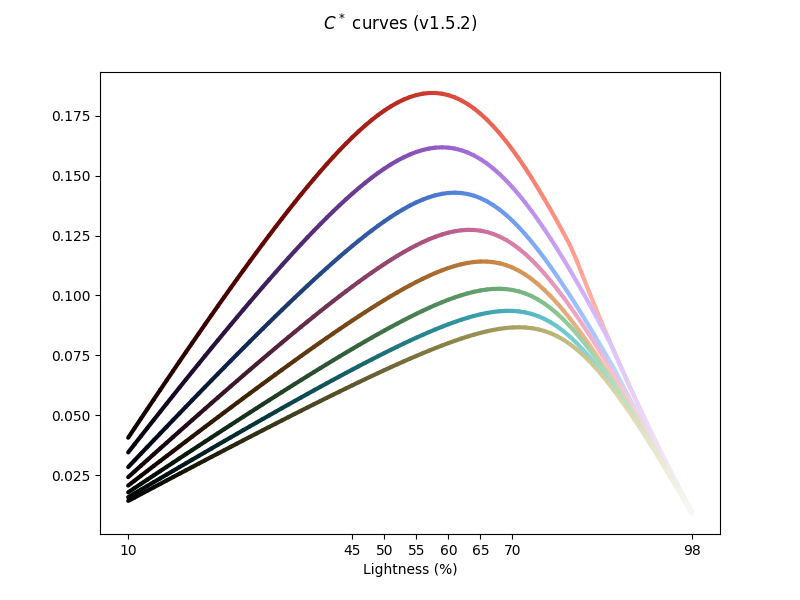
It's worth observing how the OKLCH space restricts
red(the most "aggressive" chroma curve in the palette) at the upper end of the lightness spectrum: chroma is approximately linear beyondl80. This shapes the boundary for other accent chromas that are naturally less constrained by OKCLH space itself. In the top down view, for instance, notice the width along the red-magenta-blue arc as compared to the red-yellow-green arc: the differences in the distance to the white point is significant. Whileredreaches the chroma bounds at its particular radial slice, blues and violets naturally have more latitude, hence their being more affected by strict bounding.Top down cxhFront facing cxlDownloads
-
v1.5.0 Stable
2025-12-20 12:28:30 +00:00 | 15 commits to master since this releaseThe CLI generation model
v1.5.0introduces the full CLI templatization pipeline for generating custom application themes from themonobiomepalette. Scheme files assign palette values to variables, and app config templates refer to those variables. As a result, the scheme file is color-agnostic (behavior remains the same if palette values change), and config templates are palette-agnostic (depends only on scheme variables).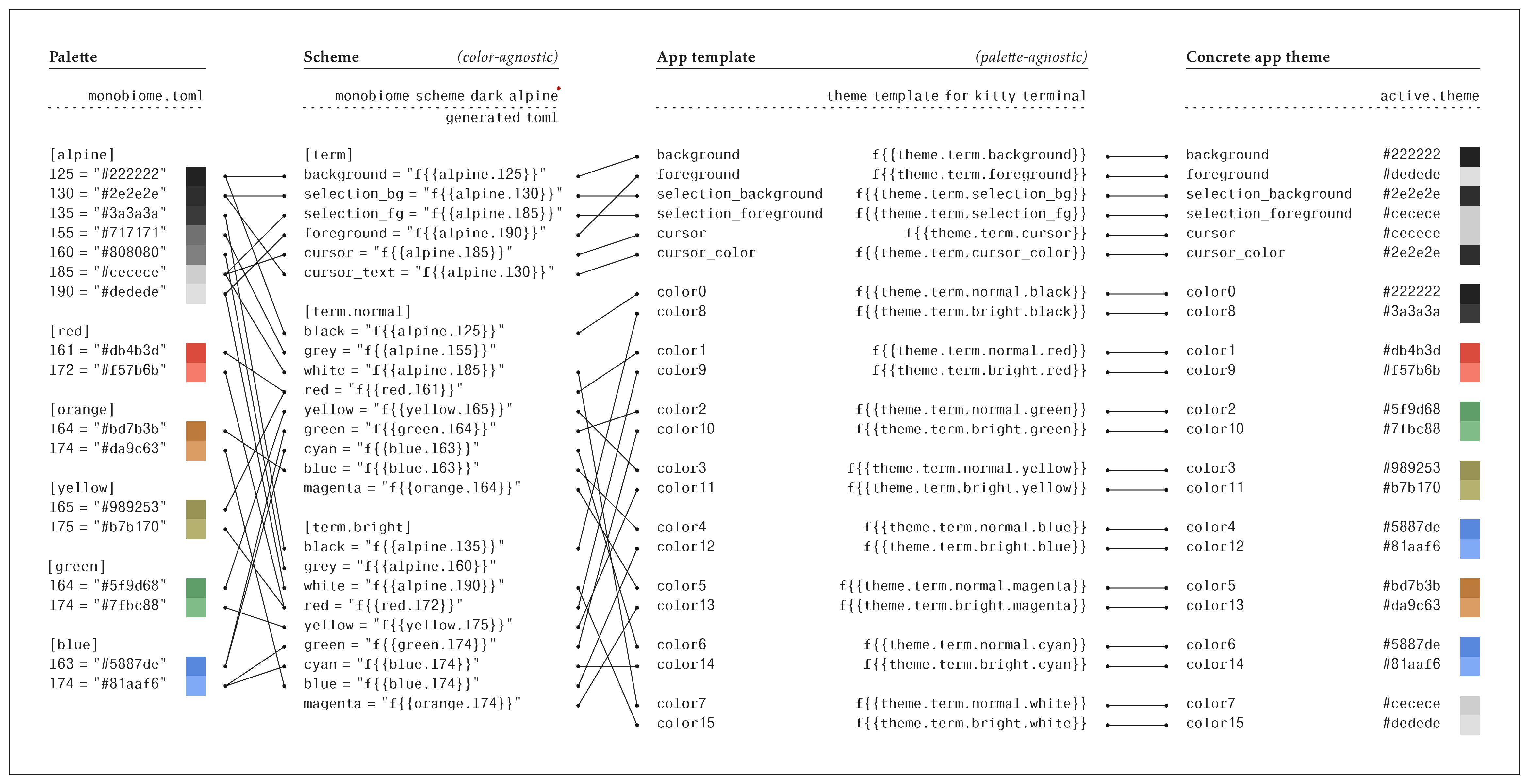
The
monobiomeCLI provides three actions:palette,scheme, andfill, and can be installed from PyPI usinguv/pipx/similar:uv tool install monobiome # or pipx install monobiomeOne can generate an app config file by first creating a scheme and using it to fill a config template:
monobiome scheme dark grassland -d 0.42 -l 20 -o scheme.toml
monobiome fill scheme.toml templates/kitty/active.theme -o kitty.theme
How the
monobiomepalette gets used to create themes is controllable entirely by parameters to themonobiome schemesubcommand (e.g., light or dark, base background lightness, contrast, etc). Full CLI usage details are as follows:-
monobiome palette: generate palette files from raw parameterized curvesusage: monobiome palette [-h] [-n {hex,oklch}] [-f {json,toml}] [-o OUTPUT] options: -n {hex,oklch}, --notation {hex,oklch} color notation to export (either hex or oklch) -f {json,toml}, --format {json,toml} format of palette file (either JSON or TOML) -o OUTPUT, --output OUTPUT output file to write palette content -
monobiome scheme: generate scheme files that match perceptual parametersusage: monobiome scheme [-h] [-m {wcag,oklch,lightness}] [-d DISTANCE] [-o OUTPUT] [-l L_BASE] [--l-step L_STEP] [--fg-gap FG_GAP] [--grey-gap GREY_GAP] [--term-fg-gap TERM_FG_GAP] {dark,light} {alpine,badlands,chaparral,savanna,grassland,reef,tundra,heathland,moorland} positional arguments: {dark,light} scheme mode (light or dark) {alpine,badlands,chaparral,savanna,grassland,reef,tundra,heathland,moorland} biome setting for scheme. options: -m {wcag,oklch,lightness}, --metric {wcag,oklch,lightness} metric to use for measuring swatch distances. -d DISTANCE, --distance DISTANCE distance threshold for specified metric -o OUTPUT, --output OUTPUT output file to write scheme content -l L_BASE, --l-base L_BASE minimum lightness level (default: 20) --l-step L_STEP lightness step size (default: 5) --fg-gap FG_GAP foreground lightness gap (default: 50) --grey-gap GREY_GAP grey lightness gap (default: 30) --term-fg-gap TERM_FG_GAP terminal foreground lightness gap (default: 60) -
monobiome fill: produce concrete application themes from a given scheme and
app templateusage: monobiome fill [-h] [-p PALETTE] [-o OUTPUT] scheme [template] positional arguments: scheme scheme file path template template file path (defaults to stdin) options: -p PALETTE, --palette PALETTE palette file to use for color definitions -o OUTPUT, --output OUTPUT output file to write filled template
Downloads
-
-
v1.4.0 Stable
2025-12-11 05:39:10 +00:00 | 23 commits to master since this releaseNew hues and CLI tool
v1.4.0introduces a few changes that broaden the accessibility of themonobiomemodel:Hue coverage: the canonical
monobiomepalette for terminals and editors still uses just five accents: red, orange, yellow, green, and blue. For wider use cases and alternative editor themes, cyan/violet/magenta accents have been added, with hues interpolated radially w.r.t. the existing accents. Associated monotones are reef/heathland/moorland, respectively.Chroma curves Color trajectories Palette Dynamic theme generation CLI: because
monobiomeis ultimately just a collection of Bézier curves in OKLCH space, one can generate perceptually uniform themes under arbitrary monotones by calculating the accent colors equidistant from that base. This is equivalent to determining the points at which a sphere centered at the monotone base intersects the accent curves; the radius of such a sphere effectively determines the theme contrast, and the colors on the sphere surface are equally perceptually distinct relative to the background.Figures below depict this process;
-l 20 -d 0.3, for instance, indicates a base lightness of20an OKLCH distance of0.3.-l 20 -d 0.3 -l 20 -d 0.4 -l 20 -d 0.5 -l 25 -d 0.3 -l 25 -d 0.4 -l 25 -d 0.5 -l 30 -d 0.3 -l 30 -d 0.4 -l 30 -d 0.5 The CLI binary can be installed via
uv tool install monobiome. There are currently two subcommands,palettefor exporting the full palette andschemefor generating parameterized schemes:monobiome palette [-h] [-n {hex,oklch}] [-f {json,toml}] [-o OUTPUT] monobiome scheme [-h] [-m {wcag,oklch,lightness}] [-d DISTANCE] [-o OUTPUT] [-l L_BASE] [--l-step L_STEP] [--fg-gap FG_GAP] [--grey-gap GREY_GAP] [--term-fg-gap TERM_FG_GAP] {dark,light} {alpine,badlands,chaparral,savanna,grassland,reef,tundra,heathland,moorland}Downloads
-
v1.3.0 Stable
2025-11-16 01:01:56 +00:00 | 29 commits to master since this releaseRestore partial pre-
v1.2.0vibrancyv1.2.0washes out some of the existing accent vibrancy due to the increasingly strong constraints placed on chroma curves in service of consistent hue roles. This release relaxes these constraints slightly, restoring a middle ground on chroma without mixing accent roles.Rather than approximately linear shifts in chroma curve area, the residual area under monotonically ordered chroma curves is now approximately exponentially increasing. This allows accents to more naturally "fill out" their chroma boundaries.
v1.2.0chroma curvesv1.3.0chroma curvesNew contrast tooling for scheme generation
Schemes can now be generated under arbitrary contrast thresholds for various metrics (e.g., WCAG, OKLCH distance). See the v1.3.0 notebook for details.
3D figures for
v1.3.0:new color trajectories in OKLCH space sphere intersection with OKLCH manifold drawn outward from a monotone base at L15, showing where colors exceed 0.5 OKLCH distance Downloads
-
v1.2.0 Stable
2025-10-30 06:55:59 +00:00 | 34 commits to master since this releaseContinuous models of accent chroma curves
Reworks the shapes of chroma curves for accent colors at a high lightness resolution. There are two critical changes:
- 3-point Bézier splines are parameterized to loosely fit the chroma points at 5% lightness jumps from palette
v1.1.1. While\delta Cwas reasonably well controlled in previous versions, these settings were somewhat ad hoc; the parameterized curves provide a more consistent, reproducible means of describing this relationship. This additionally allows shades to be generated for arbitrary lightness values, not just the 5% increments fromv1.1.1.
- Chroma curves are adjusted to establish more consistent "roles" for each hue across the lightness spectrum. Because each accent color has a fixed hue across all lightness levels, chroma is the only parameter that contributes to perceptual distance against fixed monotones. Bézier control points and curves are shifted to create chroma band offsets that establish a consistent perceptual order for accents at all lightness levels. This can be compared to the less consistent chroma crossing from
v1.1.1; see the differences below.
Downloads
- 3-point Bézier splines are parameterized to loosely fit the chroma points at 5% lightness jumps from palette
-
v1.1.1 Stable
2025-10-20 05:39:23 +00:00 | 40 commits to master since this releaseIncreases contrast of the text box borders in Firefox themes.
Bumping version to sync with public Mozilla theme listing.
Downloads
-
v1.1.0 Stable
2025-10-09 23:55:02 +00:00 | 47 commits to master since this releaseFully automated config generation pipeline
This release bundles up the latest palette definition with a fully reproducible generation pipeline for all apps (now including Firefox themes). This leverages the
symconfbatch generation utility:symconf -c templates/ generate -o app-config/which fills all app config templates for all theme variants in one command.
Downloads
-
v1.0.2 Stable
2025-10-06 12:49:17 +00:00 | 54 commits to master since this releaseNew monotone variants: Chapparal & Badlands
This update attains parity between accents and monotones: aside from the default gray, each monotone originates from the hue of an accent. The new palette makes this clear:
Downloads